Block 1 • Home Assistant Architecture and Automation
Home Assistant, Edge AI, Local LLMs,
and Intelligent Systems
After completing this module, students should be able to:
- distinguish monitoring, automation, control, artificial intelligence, and safety functions;
- model devices in Home Assistant using entities, states, attributes, devices, areas, and integrations;
- design trigger–condition–action automations that are bounded, observable, and resistant to feedback loops;
- integrate MQTT devices using explicit topics, availability, discovery, command acknowledgement, and access control;
- explain edge AI and select suitable processors, accelerators, models, and deployment formats;
- measure classification, detection, regression, and anomaly-detection performance beyond a single accuracy value;
- build a reproducible data and model lifecycle that addresses leakage, drift, uncertainty, and versioning;
- explain the operation and limitations of local large language models;
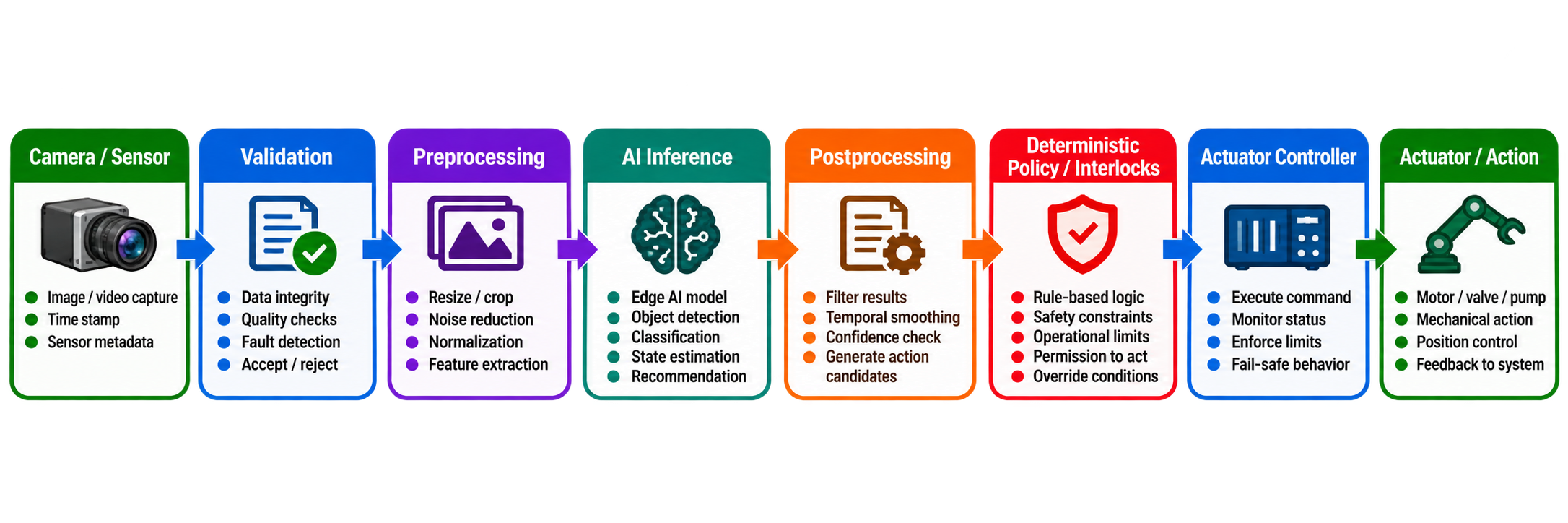
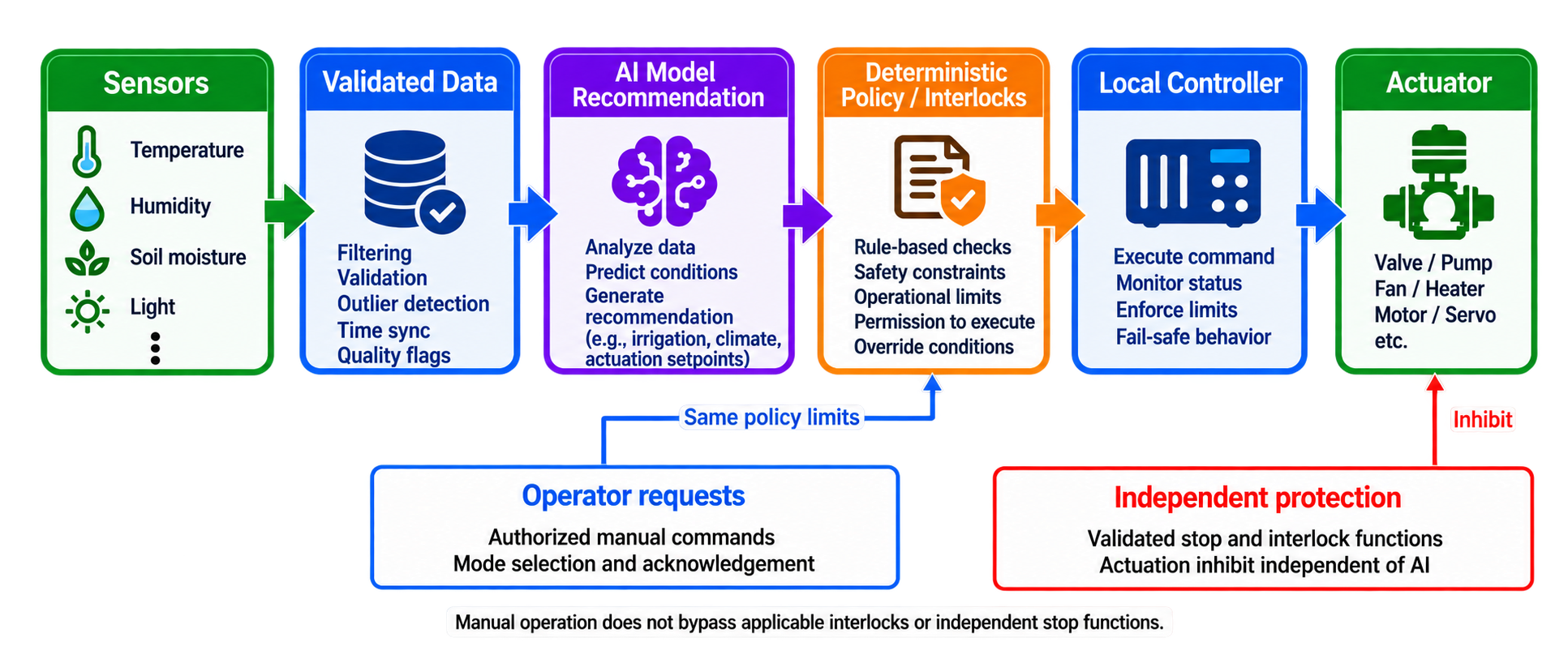
- constrain AI-generated decisions with deterministic validation, least privilege, and safe fallback; and
- produce engineering evidence suitable for a course portfolio and a technical job interview.
9.1 From Monitoring to Intelligent Action
The words monitoring, automation, control, and AI are often mixed together, although they describe different functions.
| Function | Purpose | Example |
|---|---|---|
| Monitoring | Observe and present state without changing the process | Display greenhouse temperature and communication age |
| Rule automation | Execute explicit logic after an event or state change | Send an alert if soil moisture remains low for 30 minutes |
| Function | Purpose | Example |
|---|---|---|
| Feedback control | Continuously reduce error between a measured and desired state | Modulate ventilation to regulate air temperature |
| Optimization | Select actions that improve an objective under constraints | Schedule irrigation while limiting water and electricity use |
| Machine learning | Estimate a mapping learned from data | Classify whether a leaf image shows disease symptoms |
| Generative AI | Produce new text, code, images, or structured proposals from context | Summarize maintenance records and propose diagnostic steps |
| Safety function | Detect or prevent unacceptable physical risk | Remove motor power when a guard is opened |
A dashboard is not a controller, an automation rule is not necessarily a safety function, and a machine-learning score is not a verified physical fact. The architecture must make these boundaries explicit.
9.2 Home Assistant Architecture
Home Assistant is an open-source integration and automation platform. It can collect device states, expose controls, execute automations, maintain history, and present dashboards. Although it was developed for home automation, the same concepts are useful for laboratories, greenhouses, mobile-robot support systems, and experimental monitoring. It should not be confused with a programmable logic controller, a hard real-time controller, or a certified safety system.
The main Home Assistant concepts are:
Integration: Software that connects Home Assistant to a protocol, product, or service, such as MQTT, Modbus, a weather service, or a smart plug.
Device: A physical or logical product containing one or more entities, such as an ESP32 environmental node.
Entity: One observable or controllable item. Examples are sensor.greenhouse_temperature, binary_sensor.door, and switch.irrigation_pump.
State: The primary current value of an entity. A temperature entity may have state 21.8; a switch may be on or off.
Attribute: Additional metadata associated with an entity, such as unit, battery level, or device class. Attributes should not be used as an uncontrolled database.
Area: A logical or physical grouping such as Greenhouse 1, Barn East, or Robot Laboratory.
Event: A time-stamped occurrence on the internal event bus.
Service or action: An operation that can be requested, such as turning on a switch or sending a notification.
Automation: Logic consisting primarily of triggers, conditions, and actions.
Script: A reusable sequence of actions that may receive parameters.
Scene: A named collection of desired entity states.
Dashboard: A user interface for observing and commanding the system.
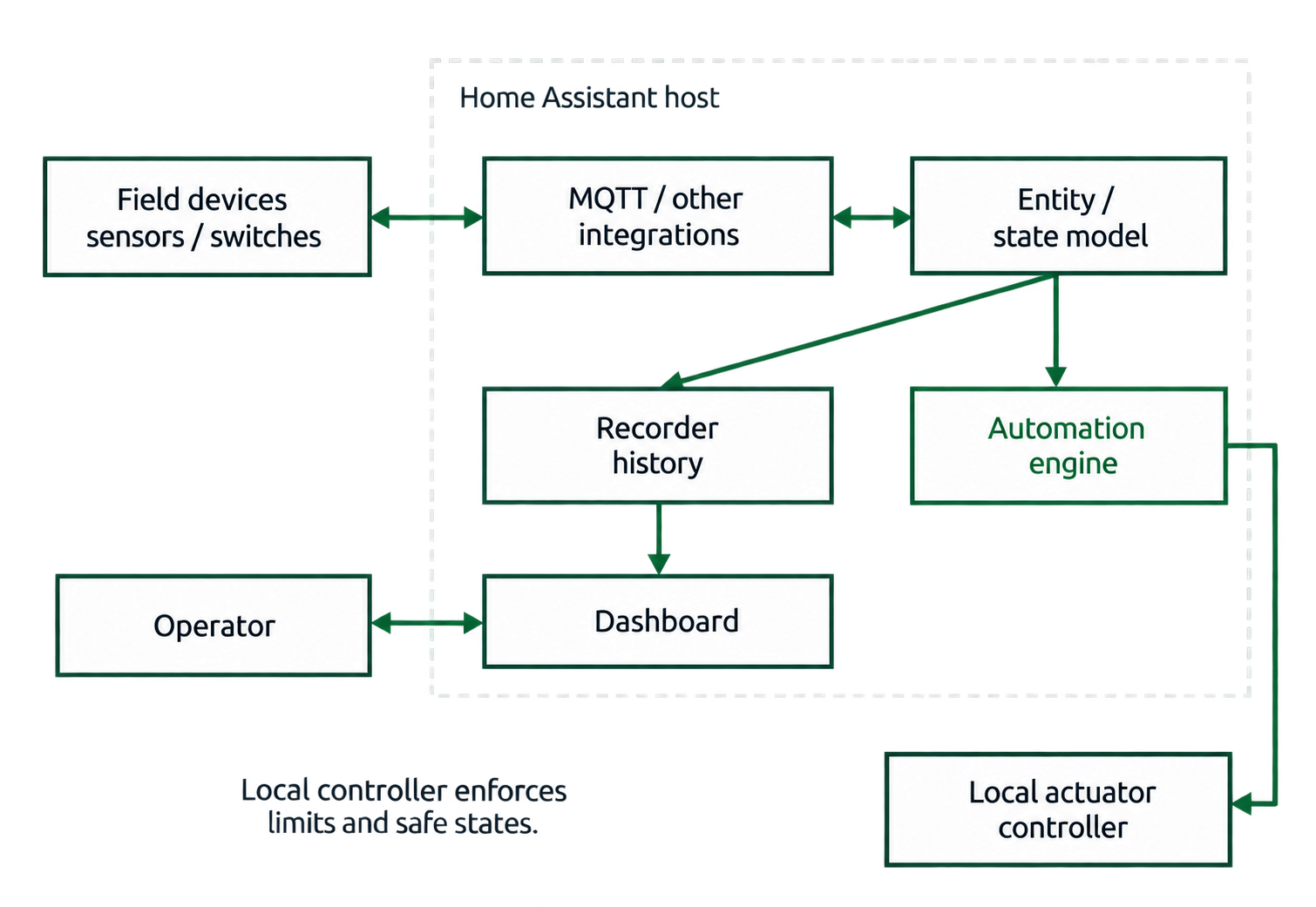
Figure 9.1. Home Assistant is an integration and supervision layer. Time-critical and safety-critical control remains local to an appropriate controller.
9.3 Automations as Explicit State Machines
An automation normally contains:
- a trigger, which starts evaluation;
- zero or more conditions, which must be true before execution; and
- one or more actions, which produce effects.
The important engineering questions are not only “does the rule work?” but also:
- What happens when the measurement is missing, stale, unavailable, or invalid?
- Can repeated events create repeated commands?
- Can the action itself retrigger the automation?
- What happens if two runs overlap?
- Is there a minimum on-time, minimum off-time, cooldown, timeout, or rate limit?
- How is manual override represented, and when does it expire?
- How will an operator know that the automation failed?
Home Assistant automation modes define what happens when a new trigger arrives while an earlier run is active. single rejects the new run, restart replaces the existing run if the conditions are met, queued preserves the order of admitted runs, and parallel allows concurrent runs. Conditions for admitting a queued run are checked when it is triggered. The correct mode follows the physical process. Concurrent irrigation commands, for example, may be unsafe or wasteful.[68]
| 1 | alias: Greenhouse high-temperature ventilation |
| 2 | mode: single |
| 3 | triggers: |
| 4 | - trigger: numeric_state |
| 5 | entity_id: sensor.greenhouse_air_temperature |
| 6 | above: 30 |
| 7 | for: "00:05:00" |
| 8 | conditions: |
| 9 | - condition: state |
| 10 | entity_id: input_boolean.automatic_climate_control |
| 11 | state: "on" |
| 12 | - condition: state |
| 13 | entity_id: binary_sensor.ventilation_fault |
| 14 | state: "off" |
| 15 | actions: |
| 16 | - action: switch.turn_on |
| 17 | target: |
| 18 | entity_id: switch.greenhouse_fan |
| 19 | - wait_for_trigger: |
| 20 | - trigger: numeric_state |
| 21 | entity_id: sensor.greenhouse_air_temperature |
| 22 | below: 27 |
| 23 | for: "00:03:00" |
| 24 | timeout: "00:30:00" |
| 25 | continue_on_timeout: true |
| 26 | - action: switch.turn_off |
| 27 | target: |
| 28 | entity_id: switch.greenhouse_fan |
| 29 | - if: |
| 30 | - condition: template |
| 31 | value_template: "{{ wait.completed == false }}" |
| 32 | then: |
| 33 | - action: notify.operator |
| 34 | data: |
| 35 | message: "Ventilation stopped after maximum permitted run time." |
This example illustrates persistence before activation, separate on/off thresholds, a timeout, an enable condition, an initial fault check, and notification. Replace the example entity IDs and notify.operator with configured entities and an available notification action. The temperature entity must use degrees Celsius because these numeric thresholds compare its state value.
The conditions are checked when the run starts; changing the enable flag or fault entity during the wait does not itself stop the fan. The for timers do not survive automation reload or Home Assistant restart, and cancellation can prevent the final off action. A numeric-state trigger also requires a threshold crossing, so persistent high temperature after the timeout does not automatically start another cycle. These are deliberate limitations of this introductory sequence, not guarantees of continuous regulation. For deployment, add explicit state and freshness supervision, startup reconciliation, and controller-enforced maximum runtime; test each transition.[68]
A motor overload, guard circuit, or emergency stop must be enforced independently where the risk assessment requires it. In a real greenhouse, stopping ventilation may itself worsen overheating, so the fallback must follow the physical hazard analysis rather than assuming that every output should be off.
9.4 Avoiding Automation Failure Patterns
| Failure pattern | Consequence | Better design |
|---|---|---|
| No hysteresis | Output chatters around a threshold | Separate on/off thresholds and minimum dwell times |
| No stale-data check | Old data drives a current decision | Carry observation time and reject excessive age |
| Action retriggers itself | Feedback loop or command storm | Separate requested and measured state; add guards |
| Unlimited parallel runs | Race conditions and repeated physical actions | Select a deliberate automation mode |
| No acknowledgement | Dashboard claims an action that never occurred | Return commanded, accepted, and measured state separately |
| Network-only stop | Actuator remains active after connectivity loss | Enforce a local command lease or watchdog |
| Silent failure | Operator assumes the system is healthy | Publish availability, diagnostics, and actionable alerts |
| Hard-coded credentials | Secret exposure and difficult rotation | Use secret storage and narrow broker permissions |
9.5 MQTT Integration and Discovery
MQTT is a common bridge between embedded nodes and Home Assistant. The broker routes messages but does not by itself know whether a payload is physically credible. A robust device design separates:
- state topics, which report measured or confirmed state;
- command topics, which request an action;
- acknowledgement or result topics, which report acceptance or rejection;
- availability topics, which report whether the node is operational;
- configuration or discovery topics, which describe entities; and
- diagnostic topics, which expose firmware version, reset reason, message age, and faults.
| 1 | eml/v1/greenhouse-01/environment/state |
| 2 | {"schema":1,"sequence":931,"observed_at":"2026-10-16T10:15:00Z", |
| 3 | "temperature_C":28.4,"relative_humidity_pct":64.2,"quality":"valid"} |
| 4 | |
| 5 | eml/v1/greenhouse-01/fan/command |
| 6 | {"schema":1,"command_id":"c-817","requested_state":"on", |
| 7 | "expires_at":"2026-10-16T10:15:10Z"} |
| 8 | |
| 9 | eml/v1/greenhouse-01/fan/result |
| 10 | {"schema":1,"command_id":"c-817","accepted":true, |
| 11 | "measured_state":"on","fault":null} |
| 12 | |
| 13 | eml/v1/greenhouse-01/availability |
| 14 | online |
MQTT discovery publishes configuration that allows Home Assistant to create entities automatically. It is convenient for fleets, but configuration topics effectively influence the user interface and command paths. Restrict which clients may publish discovery messages. Use unique identifiers that remain stable across restarts and do not place credentials or personal information in topic names.
Retained state is useful for a new subscriber, but it can be mistaken for a fresh observation. Include an observation timestamp and display data age. A retained command is usually dangerous because a restarted actuator might execute an old request. Commands should normally expire and carry unique identifiers.
9.6 What Edge AI Means
Artificial intelligence is a broad term for systems performing tasks associated with perception, prediction, reasoning, or decision support. Machine learning learns behavior from data rather than expressing every rule explicitly. Inference applies a trained model to new input. Edge AI executes inference near the data source, such as on a sensor node, mobile robot, gateway, industrial PC, Raspberry Pi, or NVIDIA Jetson.
Edge processing can provide:
- lower and more predictable communication latency;
- continued operation during cloud or Internet outages;
- reduced upstream bandwidth by transmitting events or features instead of raw data;
- better privacy when images or audio remain on site; and
- local filtering before data reaches a central service.
The costs include limited memory, compute, energy, thermal capacity, storage, and maintainability. Edge deployment also creates many copies of models and dependencies that must be inventoried, updated, monitored, and rolled back.
9.6.1 Edge and cloud are placement choices
An application need not be entirely local or entirely cloud-based. A useful hybrid architecture may execute time-sensitive detection locally, store selected evidence in a private server, and perform expensive model training centrally. Place each function according to deadlines, privacy, bandwidth, energy, availability, lifecycle, and safety requirements.