Skip to content
Academia.
ELEmbedded LinuxT550077101 · Fall 2026
CourseFall 2026

Friday · 12:00–16:00 · Odense U174

ROS 2: Robot Integration, Simulation, and Deployment

Lecture 08: ROS 2 provides a structured framework for integrating robot software, communication, simulation, sensing, control, and deployment. This chapter covers ROS 2 architecture, QoS, nodes, topics, services, actions, executors, Gazebo, CoppeliaSim, Raspberry Pi and NVIDIA Jetson deployment, micro-ROS, CAN bus, MATLAB/Simulink, navigation, industrial robotics, autonomous systems, security, containers, diagnostics, and failure analysis.

Learning objectives

✓By the end of this module, students should be able to:
✓• explain why ROS emerged, how ROS 1 and ROS 2 differ, and when neither is the right choice;
✓• model a robot as nodes, input/output topics, services, actions, parameters, and lifecycle states;
✓• choose ROS 2 Quality of Service settings from data value, rate, reliability, and timing requirements;
✓• build, inspect, launch, test, record, and diagnose a small ROS 2 application;
✓• configure communication across multiple Linux machines and identify discovery, firewall, and network failures;
✓• reason about latency, deterministic behavior, and the limits of DDS/ROS 2 guarantees;
✓• integrate Raspberry Pi, NVIDIA Jetson, microcontrollers, CAN bus, MATLAB and Simulink with ROS 2;
✓• distinguish ROS 2 from robotic middleware from certified safety and flight-control architectures;
✓• place ROS 2 containers, PLCs, autopilots, and independent safety controllers at appropriate boundaries;
✓• decide whether ROS 2 reduces operational risk and failure evidence.
Block 112:00–12:50content

Block 1 · 12:00–12:50 · ROS 2 Foundations, Architecture, and Communication

CHAPTER 8

ROS 2, Robot Integration, Simulation,
and Deployment

Learning objectives

By the end of this module, students should be able to:

  • explain why ROS emerged, how ROS 1 and ROS 2 differ, and when neither is the right choice;
  • model a robot as nodes, typed interfaces, topics, services, actions, parameters, transforms, and lifecycle states;
  • choose ROS 2 Quality of Service settings from data value, rate, reliability, and timing requirements;
  • build, inspect, launch, test, record, and diagnose a small ROS 2 application;
  • configure communication across multiple Linux machines and identify discovery, firewall, time, and network failures;
  • reason about latency, determinism, real-time behavior, and the limits of DDS/ROS 2 guarantees;
  • integrate Raspberry Pi, NVIDIA Jetson, microcontrollers, CAN bus, MATLAB and Simulink, Gazebo, and CoppeliaSim;
  • distinguish research/prototyping middleware from certified safety and flight-control architectures;
  • place ROS 2, containers, PLCs, autopilots, and independent safety controllers at defensible system boundaries; and
  • decide whether ROS 2 reduces total system risk and effort for a particular project.
ROS is integration infrastructure—not a robot brain
ROS provides conventions, libraries, tools, message definitions, communication, visualization, recording, and a large ecosystem. It does not automatically provide perception, planning, control, safety, security, real-time performance, or a good architecture. A poorly divided ROS graph is still a poorly designed robot; it is simply distributed across more processes.

8.1  Robotics Before ROS

Before ROS, robot teams commonly built their own message formats, device drivers, process launchers, logging, visualization, coordinate-frame handling, and network transport. Research software was often tied to one laboratory or robot. Reusing a laser scanner, planner, or mapping algorithm could require major adaptation.

EMBEDDED LINUX Fall 2026

ROS was not the first robotics middleware. Player/Stage, YARP, Orocos, Microsoft Robotics Developer Studio, vendor frameworks, real-time control systems, and custom message buses addressed parts of the same problem. Industrial robots commonly used proprietary controllers, PLCs, fieldbuses, and offline programming tools. These systems could be reliable, but cross-vendor experimentation and software sharing were difficult.

Traditional firmware remains appropriate today for a bounded device with a small number of sensors and actuators, strict memory or timing limits, and no need for a robotics software ecosystem. A 500-line motor controller does not become better merely because it is separated into ten ROS nodes.

8.2  A Short History of ROS

ROS grew from robotics research work associated with Stanford and Willow Garage in the late 2000s. ROS 1 established a practical ecosystem of packages, message passing, tools, transforms, visualization, bag recording, and build conventions. It became extremely influential in laboratories, education, startups, and commercial prototypes.

ROS 1 used a central master for name registration and discovery and used custom TCPROS/UDPROS transports. Its original assumptions were not designed around production security, embedded real-time behavior, unreliable wide-area networks, or long-lived multi-vendor industrial products.

Work on ROS 2 began to address those limitations without discarding the successful conceptual model. ROS 2 adopted Data Distribution Service (DDS) concepts through a middleware abstraction, added explicit Quality of Service, improved multi-platform support, security integration, node lifecycle concepts, and stronger support for embedded and real-time work. Open Robotics and the wider community maintain the ecosystem. ROS 1 Noetic reached its official end of support on 31 May 2025; new course projects should normally use a supported ROS 2 distribution.

Names, installation targets, and support dates change [57]. Select a ROS 2 distribution by its official support window, target operating system, CPU architecture, and required package availability rather than selecting the newest name automatically.

8.3  ROS 1 and ROS 2 Compared

Concern ROS 1 ROS 2
Discovery Central ROS master supports registration Discovery through the selected RMW; commonly distributed DDS discovery
Transport Primarily TCPROS and UDPROS DDS or supported non-DDS middleware through the RMW interface
QoS Limited application-facing control Reliability, durability, history, depth, deadline, lifespan, and liveliness policies
Security Not designed with a complete standard security model Middleware-specific security; DDS Security with supported DDS implementations
EMBEDDED LINUX Fall 2026
Concern ROS 1 ROS 2
Real-time intent Difficult due to architecture and APIs Designed to enable better real-time paths, but not automatic
Platforms Primarily Linux-focused Linux, Windows, macOS, and embedded-related paths depending on distribution
Managed lifecycle Application-specific patterns Standard lifecycle-node state model available
Components Nodelets and process-level nodes Composable nodes and executors
Parameters Centralized conventions around master/parameter server Parameters owned by individual nodes
Build catkin ament build system and colcon workspace tool
ROS 1 bridge Not applicable Can exchange supported ROS 1/ROS 2 interfaces during migration
Current direction Legacy maintenance/migration context Active ecosystem for new development

ROS 2 is not simply ROS 1 with a new command syntax. Discovery, QoS, parameter ownership, launch, time, lifecycle, and middleware behavior require new reasoning. A migration that mechanically translates APIs may preserve the original architectural weaknesses.

8.4  Why Use ROS 2?

ROS 2 is attractive when a system benefits from:

  • reusable drivers, perception, navigation, manipulation, and visualization packages;
  • typed communication between independently developed components;
  • coordinate-frame management through tf2;
  • robot description using URDF/Xacro;
  • recording and replay with ros2 bag;
  • inspection using command-line tools, RViz, rqt, tracing, and diagnostics;
  • simulation integration and hardware abstraction;
  • multi-language development, especially C++ and Python; and
  • distributed computation across onboard computers and development workstations.

ROS 2 may be unnecessary or harmful when the product is a small fixed-function controller, has extremely limited resources, has a simple certified architecture, cannot tolerate discovery traffic, needs a very small attack surface, or would gain no meaningful package/tool reuse. Integration cost, dependency lifecycle, middleware tuning, and validation can exceed the value.

Situation Likely choice Reason
Single sensor and relay service MCU firmware or small Linux service ROS graph adds little value
EMBEDDED LINUX Fall 2026
Situation Likely choice Reason
Research mobile robot ROS 2 Drivers, transforms, bags, visualization, navigation ecosystem
Fast motor-current loop MCU/drive controller Deterministic local control and safety boundary
Camera/LiDAR perception ROS 2 on Linux/accelerator High-rate typed data and mature tooling
Certified emergency stop Safety relay/PLC/controller Independent certified safety function required
Fleet/cloud telemetry MQTT/HTTP plus selected ROS bridge ROS discovery is not a fleet/cloud protocol
Industrial robot cell Vendor controller/PLC plus controlled ROS 2 integration Preserve certified control and plant interlocks
Block 213:00–13:50content

Block 2 · 13:00–13:50 · ROS 2 Quality, Discovery, and Practical Development

EMBEDDED LINUX Fall 2026

8.5   The ROS 2 Computational Graph

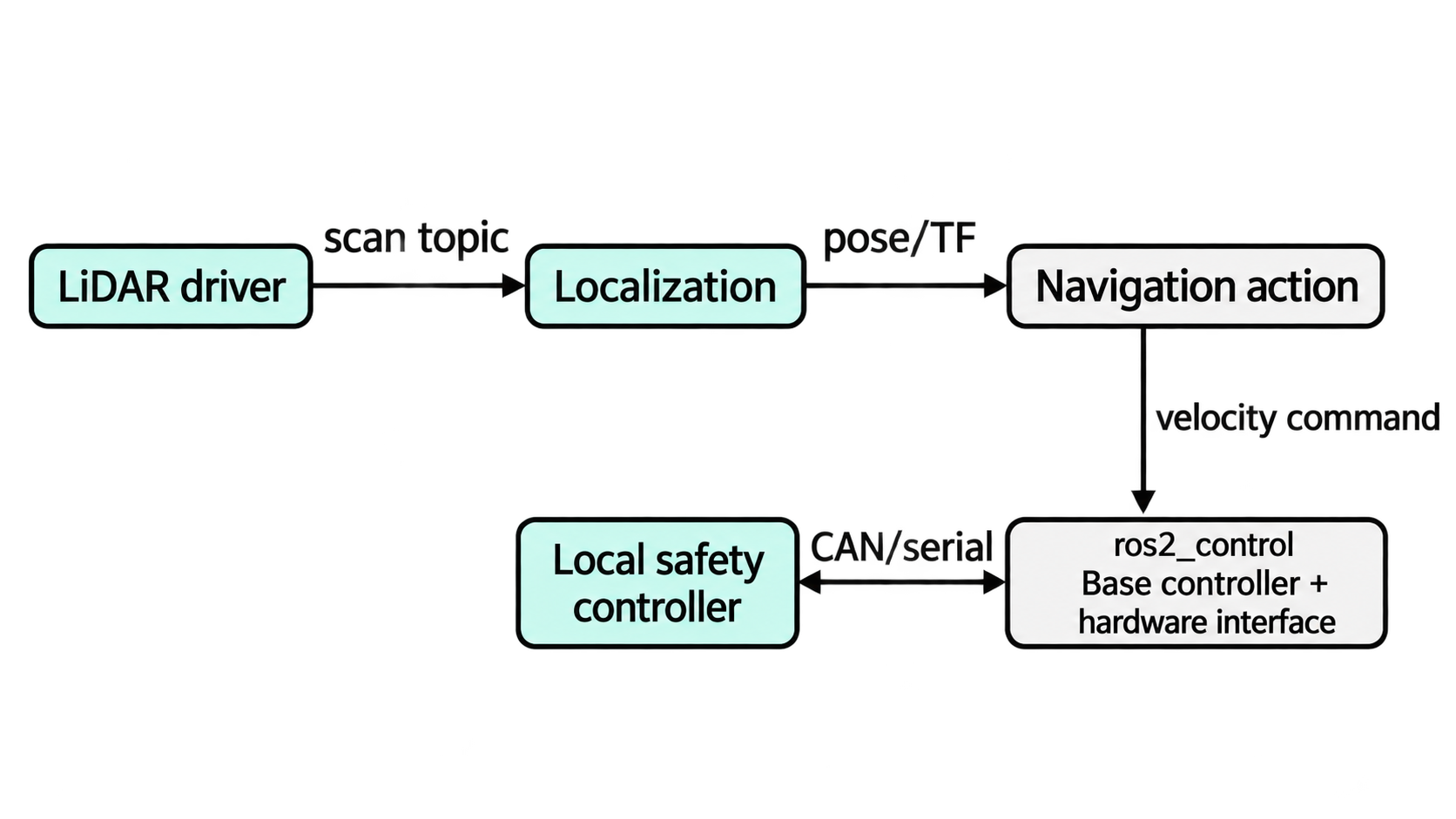
A node is a participant with a defined responsibility. It can publish and subscribe to topics, provide and call services, host actions, own parameters, and broadcast or consume transforms.

ChatGPT Image Sep 27, 2026, 10_53_17 PM
Figure 8.1.  A ROS 2 robot graph connects sensor drivers, estimation, navigation, and a base controller with its hardware interface. Topics, services, and actions serve different contracts. Local watchdogs, limits, and independent protection bound actuator behavior when high-level software fails.

EMBEDDED LINUX Fall 2026
Interaction Appropriate use Example
Topic Ongoing asynchronous stream where publishers do not wait for each subscriber Camera images, IMU, joint state, velocity command
Service Short bounded request with one response Reset counter, request calibration status
Action Long-running goal with feedback, result, and cancellation Navigate to pose, scan field row, dock
Parameter Node-owned configuration value Frame name, threshold, update rate
Transform Time-indexed spatial relationship between coordinate frames map to odom to base_link
Lifecycle Managed state transitions for configure/activate/deactivate/cleanup Sensor driver or navigation component startup

Do not use a service for continuous telemetry or block a subscriber callback for a long operation. Use an action when progress and cancellation matter. Interfaces should express physical meaning, units, frames, timestamps, and covariance rather than exposing internal implementation state.

8.6   Messages, Interfaces, Frames, and Time

ROS messages are strongly typed. A matching topic name is insufficient if types or QoS are incompatible. Standard messages improve interoperability, but only when semantics are followed.

A pose without a frame is ambiguous. ROS commonly uses tf2 to maintain time-indexed transforms among frames such as map, odom, base_link, and sensor frames. URDF describes links, joints, inertial properties, geometry, and sensor mounting; Xacro supports parameterized generation.

Header timestamps should represent observation time, not merely publication time. A camera image and IMU sample acquired at different times cannot be fused correctly because they arrived together. Clock synchronization, simulator time, bag replay, and time jumps must be handled explicitly.

Engineering caution
Do not publish an empty or arbitrary frame_id merely to satisfy a message definition. A numerically correct vector in the wrong coordinate frame can make localization and control fail while every node appears healthy.

8.7   Topics, Services, and Actions in Practice

Topics support data flow and loose temporal coupling. A subscriber that starts later may miss earlier volatile samples. Services couple a caller to a server’s availability and response time. Actions use topics/services internally to manage a goal lifecycle, feedback, cancellation, and result.

Design questions include:

  • Is the information a continuing state, discrete event, request, or long-running goal?
EMBEDDED LINUX Fall 2026
  • Does every sample matter, or only the newest?
  • Can the producer block when consumers are slow?
  • What is the maximum acceptable age?
  • What happens when publisher or subscriber restarts?
  • Is cancellation safe and observable?
  • Which component owns command authority?

An emergency stop should not be implemented as an ordinary best-effort topic traversing several computers. Safety response requires an architecture appropriate to the hazard, often including independent hardware and certified components.

8.8   Quality of Service

ROS 2 exposes DDS-derived Quality of Service policies. Matching requires compatible requested and offered policies.

Policy Choices/meaning Practical use and failure
Reliability Reliable or best effort Reliable retransmits but may add delay/resources; best effort suits replaceable high-rate samples
Durability Volatile or transient local Transient local can supply stored samples to late joiners while publisher exists
History Keep last or keep all Keep last bounds stored depth; keep all needs resource limits
Depth Number retained under keep-last Too small loses burst data; too large adds memory and stale backlog
Deadline Expected maximum interval Allows missed-deadline events; does not create scheduling by itself
Lifespan Maximum useful sample age Prevents delivery of data after its useful lifetime
Liveliness Mechanism for asserting publisher presence Detects certain publisher failures; not physical sensor validity

Sensor-data profiles often use best effort and shallow queues because a fresh scan is more useful than an old backlog. Commands may need reliable delivery, but reliable does not mean bounded-latency or safe. Incompatible QoS can produce silent non-communication even when names and types match; inspect both endpoints with ros2 topic info --verbose.

8.9   Discovery, DDS, and RMW Implementations

ROS 2 uses a ROS Middleware (RMW) abstraction over supported DDS implementations and non-DDS options such as Zenoh. The following discovery discussion assumes a DDS-based RMW; a Zenoh deployment has its own router, discovery, and security configuration [56]. DDS participants discover each other and exchange endpoint/type/QoS information. Discovery commonly uses multicast locally, which can be blocked by Wi-Fi isolation, VLANs, VPNs, firewalls, containers, or institutional networks.

EMBEDDED LINUX Fall 2026

ROS_DOMAIN_ID separates logical ROS domains on the same network. It is not authentication. Two student groups using the same topic names and domain may accidentally communicate. Security requires deliberate middleware security configuration and network policy.

Different RMW implementations can have different discovery, resource, latency, tooling, and configuration behavior. Compatible DDS-based implementations may interoperate through DDS standards, but identical behavior is not guaranteed. A DDS participant does not communicate directly with a Zenoh participant merely because their ROS interfaces match; use a supported bridge or select one compatible RMW configuration. Pin and test the chosen stack.

8.10   ROS 2 Across Multiple Machines

Multiple-machine ROS 2 can distribute sensors, compute, control, and visualization. A typical arrangement places drivers and time-sensitive processing onboard, GPU perception on a Jetson, planning on an onboard computer, and RViz on a development laptop.

For a simple trusted LAN:

  1. install compatible ROS 2 interfaces and packages on each machine;
  2. use compatible ROS distribution/RMW configuration;
  3. place intended participants in the same ROS_DOMAIN_ID;
  4. ensure unique host/node names where required;
  5. verify address, route, multicast/unicast discovery, firewall, and clock synchronization;
  6. source the intended workspace on each host;
  7. inspect discovery before sending high-rate data; and
  8. measure bandwidth, loss, latency, and recovery after link interruption.

Do not send raw uncompressed camera and point-cloud streams over a weak Wi-Fi link merely because ROS permits it. Move computation toward the sensor, reduce rate/resolution, compress where appropriate, or publish derived features. Discovery traffic and many-to-many topics can surprise network designers.

Across routed, VPN, wireless, or wide-area networks, use explicit DDS discovery servers/peers or a controlled bridge appropriate to the chosen middleware. Avoid exposing an unrestricted ROS graph directly to the Internet. ROS discovery is not a fleet-management or cloud API.

8.11   Latency and Real-Time Communication

End-to-end latency includes sensor exposure/conversion, driver buffering, kernel scheduling, serialization, middleware queues, network, deserialization, executor wait, callback execution, control computation, bus transfer, and actuator response. Measuring only DDS transport time can conceal the dominant delay.

For a chain of stages,

Tend-to-end = ∑ i Ti + ∑ j Tqueue,j.

Worst-case behavior depends on contention and scheduling, not the sum of averages. Report distribution, percentiles, maximum under defined test conditions, missed deadlines, and sample age.

Real-time engineering may require:

  • a real-time-capable Linux kernel and correct scheduler policy;
EMBEDDED LINUX Fall 2026
  • bounded callback and executor design;
  • avoiding dynamic allocation and page faults in the critical path;
  • preallocated messages, bounded queues, and suitable QoS;
  • memory locking, CPU affinity, priority design, and priority-inversion control;
  • network traffic control or real-time fieldbus below ROS;
  • intra-process, shared-memory, zero-copy, or loaned-message paths where supported;
  • ROS 2 tracing and external measurement; and
  • keeping hard, fast safety/control loops on MCUs, drives, or certified controllers.

DDS “reliable” delivery is not a hard deadline. PREEMPT_RT does not make unbounded Python callbacks deterministic. A measured low mean latency is not evidence of a worst-case bound.

8.12   Executors, Callbacks, and Concurrency

An executor determines when callbacks execute. A single-threaded executor simplifies shared-state reasoning but a long callback delays all others. A multi-threaded executor increases concurrency but introduces races, callback-group constraints, locks, and priority uncertainty.

Avoid blocking operations inside callbacks. Use bounded asynchronous work, separate callback groups, or dedicated real-time components. Measure callback duration and queue age. A fast publisher can overwhelm a slow subscriber unless QoS depth and processing strategy are bounded.

Composable nodes can run in one process and reduce serialization/copying, but one crash may affect several components and the shared process has a broader privilege boundary. Separate processes improve fault isolation at communication cost.

8.13   Practical Project: Publisher and Subscriber

The following Python example creates a synthetic temperature publisher and a subscriber that rejects invalid frames, values, or timestamps and detects loss of valid fresh samples. It uses sensor_msgs/Temperature, whose temperature unit is degrees Celsius and whose variance is expressed in squared degrees Celsius. Device identity, sequence, and quality status need additional fields in a project-specific interface. The sequence printed by this publisher is local diagnostic information and is not transmitted in this standard message.

The concrete teaching target is ROS 2 Jazzy on supported 64-bit Ubuntu 24.04, with rclpy, sensor_msgs, and colcon installed. Jazzy’s published support window extends to May 2029 [57, 56]. The source below follows the documented Python API; validate discovery and runtime behavior on the actual target. On multiple hosts, synchronize clocks. In simulation, all participating nodes must use the same ROS simulation clock.

Create a workspace and package:

Listing 8.1.  Create and build a Python ROS 2 package
1
2
3
4
5
6
7
8
9
10
source /opt/ros/jazzy/setup.bash
mkdir -p ~/eml_ros2/src
cd ~/eml_ros2/src
ros2 pkg create eml_temperature --build-type ament_python \
  --dependencies rclpy sensor_msgs

# Add publisher.py, monitor.py and the entry points below, then build:
cd ~/eml_ros2
colcon build --symlink-install

EMBEDDED LINUX Fall 2026

Save this file as eml_temperature/publisher.py inside the generated package directory src/eml_temperature/. Keep the generated __init__.py.

Listing 8.2.  Temperature publisher node
1
2
3
4
5
6
7
8
9
10
11
12
13
14
15
16
17
18
19
20
21
22
23
24
25
26
27
28
29
30
31
32
33
34
35
36
37
38
39
40
41
42
43
44
45
46
47
48
49
50
import math
import random

import rclpy
from rclpy.node import Node
from rclpy.executors import ExternalShutdownException
from rclpy.qos import QoSProfile, ReliabilityPolicy, HistoryPolicy
from sensor_msgs.msg import Temperature


class TemperaturePublisher(Node):
    def __init__(self):
        super().__init__('temperature_publisher')
        qos = QoSProfile(
            reliability=ReliabilityPolicy.BEST_EFFORT,
            history=HistoryPolicy.KEEP_LAST,
            depth=5)
        self.publisher = self.create_publisher(
            Temperature, '/eml/temperature', qos)
        self.timer = self.create_timer(0.5, self.publish_sample)
        self.sequence = 0

    def publish_sample(self):
        self.sequence += 1
        value = 22.0 + random.uniform(-0.2, 0.2)
        if not math.isfinite(value):
            self.get_logger().error('Rejected non-finite sample')
            return

        msg = Temperature()
        msg.header.stamp = self.get_clock().now().to_msg()
        msg.header.frame_id = 'ambient_sensor'
        msg.temperature = value
        # Variance of uniform noise on [-0.2, 0.2].
        msg.variance = (0.4 ** 2) / 12.0
        self.publisher.publish(msg)
        self.get_logger().info(
            f'seq={self.sequence} temperature_C={value:.2f}')


def main(args=None):
    rclpy.init(args=args)
    node = TemperaturePublisher()
    try:
        rclpy.spin(node)
    except (KeyboardInterrupt, ExternalShutdownException):
        pass
    finally:
        node.destroy_node()
        rclpy.try_shutdown()

Save the subscriber as eml_temperature/monitor.py. Its watchdog uses a steady clock, so a paused simulation clock cannot conceal a stopped publisher. The observation-age check uses ROS time, which must agree with the publisher. The thresholds are teaching choices, not certified safety limits.

EMBEDDED LINUX Fall 2026
Listing 8.3.  Validated temperature subscriber node
1
2
3
4
5
6
7
8
9
10
11
12
13
14
15
16
17
18
19
20
21
22
23
24
25
26
27
28
29
30
31
32
33
34
35
36
37
38
39
40
41
42
43
44
45
46
47
48
49
50
51
52
53
54
55
56
57
58
59
60
61
62
63
64
65
66
67
68
69
70
71
72
73
74
75
import math

import rclpy
from rclpy.node import Node
from rclpy.executors import ExternalShutdownException
from rclpy.clock import Clock, ClockType
from rclpy.qos import qos_profile_sensor_data
from sensor_msgs.msg import Temperature


class TemperatureMonitor(Node):
    def __init__(self):
        super().__init__('temperature_monitor')
        self.subscription = self.create_subscription(
            Temperature,
            '/eml/temperature',
            self.on_sample,
            qos_profile_sensor_data)
        self.steady = Clock(clock_type=ClockType.STEADY_TIME)
        self.last_valid_ns = None
        self.last_observed_ns = None
        self.max_age_s = 1.5
        self.timer = self.create_timer(
            0.5, self.check_freshness, clock=self.steady)

    def on_sample(self, msg):
        if msg.header.frame_id != 'ambient_sensor':
            self.get_logger().error('Unexpected sensor frame')
            return
        if (not math.isfinite(msg.temperature) or
                not -50.0 <= msg.temperature <= 100.0):
            self.get_logger().error('Invalid temperature')
            return
        stamp = msg.header.stamp
        if not 0 <= stamp.nanosec < 1000000000:
            self.get_logger().error('Invalid timestamp field')
            return
        observed_ns = stamp.sec * 1000000000 + stamp.nanosec
        age_s = (self.get_clock().now().nanoseconds -
                 observed_ns) / 1e9
        if age_s < -0.1 or age_s > self.max_age_s:
            self.get_logger().error('Stale/future observation')
            return
        # Invalid arrivals never refresh this health timestamp.
        self.last_valid_ns = self.steady.now().nanoseconds
        self.last_observed_ns = observed_ns
        self.get_logger().info(
            f'value_C={msg.temperature:.2f} age_s={age_s:.3f}')

    def check_freshness(self):
        if self.last_valid_ns is None:
            self.get_logger().warning('No valid fresh sample received')
            return
        silence_s = (self.steady.now().nanoseconds -
                     self.last_valid_ns) / 1e9
        age_s = (self.get_clock().now().nanoseconds -
                 self.last_observed_ns) / 1e9
        if age_s < -0.1:
            self.get_logger().error('ROS clock moved backwards')
            self.last_valid_ns = None
        elif silence_s > self.max_age_s or age_s > self.max_age_s:
            self.get_logger().error(
                f'Stale: silence_s={silence_s:.2f} age_s={age_s:.2f}')


def main(args=None):
    rclpy.init(args=args)
    node = TemperatureMonitor()
    try:
        rclpy.spin(node)
    except (KeyboardInterrupt, ExternalShutdownException):
        pass
    finally:
        node.destroy_node()
        rclpy.try_shutdown()
EMBEDDED LINUX Fall 2026

In the generated package’s setup.py, replace the existing entry_points argument with the following block; retain the other generated arguments. The generated setup.cfg must continue to install scripts under the package’s lib/ directory.

1
2
3
4
5
6
entry_points={
    'console_scripts': [
        'temperature_publisher = eml_temperature.publisher:main',
        'temperature_monitor = eml_temperature.monitor:main',
    ],
},

After rebuilding, open three terminals. Source the underlay and workspace in each terminal before running its command; publisher and monitor are long-running processes and cannot be started sequentially in one foreground shell.

1
2
3
4
5
6
7
8
9
10
11
12
13
14
15
16
17
# Run these two setup commands in EACH terminal:
source /opt/ros/jazzy/setup.bash
source ~/eml_ros2/install/setup.bash

# Terminal 1:
ros2 run eml_temperature temperature_publisher

# Terminal 2:
ros2 run eml_temperature temperature_monitor

# Terminal 3 (inspection commands):
ros2 node list
ros2 node info /temperature_publisher
ros2 topic list -t
ros2 topic info /eml/temperature --verbose
ros2 topic hz /eml/temperature
ros2 topic echo /eml/temperature --qos-reliability best_effort

Test stopping the publisher, incompatible QoS, delayed callbacks, two publishers, and a changed frame. Also send non-finite/out-of-range values and old timestamps: these must not refresh the valid-sample watchdog. A paused simulation should trigger the steady-clock silence check; a backward ROS-time jump should invalidate the previous freshness state. This monitor reports faults; it does not implement an actuator stop or an independent watchdog. The educational result is not merely that text appears; it is understanding graph, type, time, QoS, and failure evidence.

Block 314:00–14:50content

Block 3 · 14:00–14:50 · ROS 2 Simulation, Platforms, and Hardware Integration

EMBEDDED LINUX Fall 2026

8.14   Launch, Parameters, Bags, and Diagnostics

A launch description starts a coherent configuration of nodes, parameters, namespaces, remappings, and lifecycle actions. Keep environment-specific values outside source code. Parameter changes should be validated and, where safety matters, restricted or applied only in a non-active state.

ros2 bag record captures selected topics for replay and analysis. Bags are evidence only if clock, topic types, QoS, calibration, software revision, and test conditions are recorded. High-rate images and point clouds consume storage quickly. A bag can reproduce input streams but not every scheduling, device, network, or physical effect.

Diagnostics should report component identity, lifecycle state, last valid sample age, rates, dropped data, hardware status, temperature, and fault reason. Avoid a single Boolean “OK” that hides degraded behavior.

8.15   Gazebo Simulation

Gazebo provides physics simulation, sensors, environments, and ROS integration. Modern Gazebo releases are distinct from Gazebo Classic; tutorials and plugin names must match the installed generation. ROS 2 integration commonly uses the ros_gz family of bridges/packages.

A simulation workflow includes:

  1. create URDF/SDF geometry, mass, inertia, collision, joints, and frames;
  2. configure actuators, controllers, sensors, update rates, noise, and latency;
  3. connect simulated interfaces to the same ROS message contracts used by hardware;
  4. visualize transforms and sensor data in RViz;
  5. test launch, reset, time, and bridge behavior; and
  6. compare simulation outputs with physical measurements and refine the model.

Simulation is not proof of physical safety or performance. Incorrect inertia, friction, actuator saturation, wheel slip, sensor timing, collision geometry, and contact parameters can make a controller appear excellent. Use simulation for repeatability, edge cases, and development, then validate against hardware.

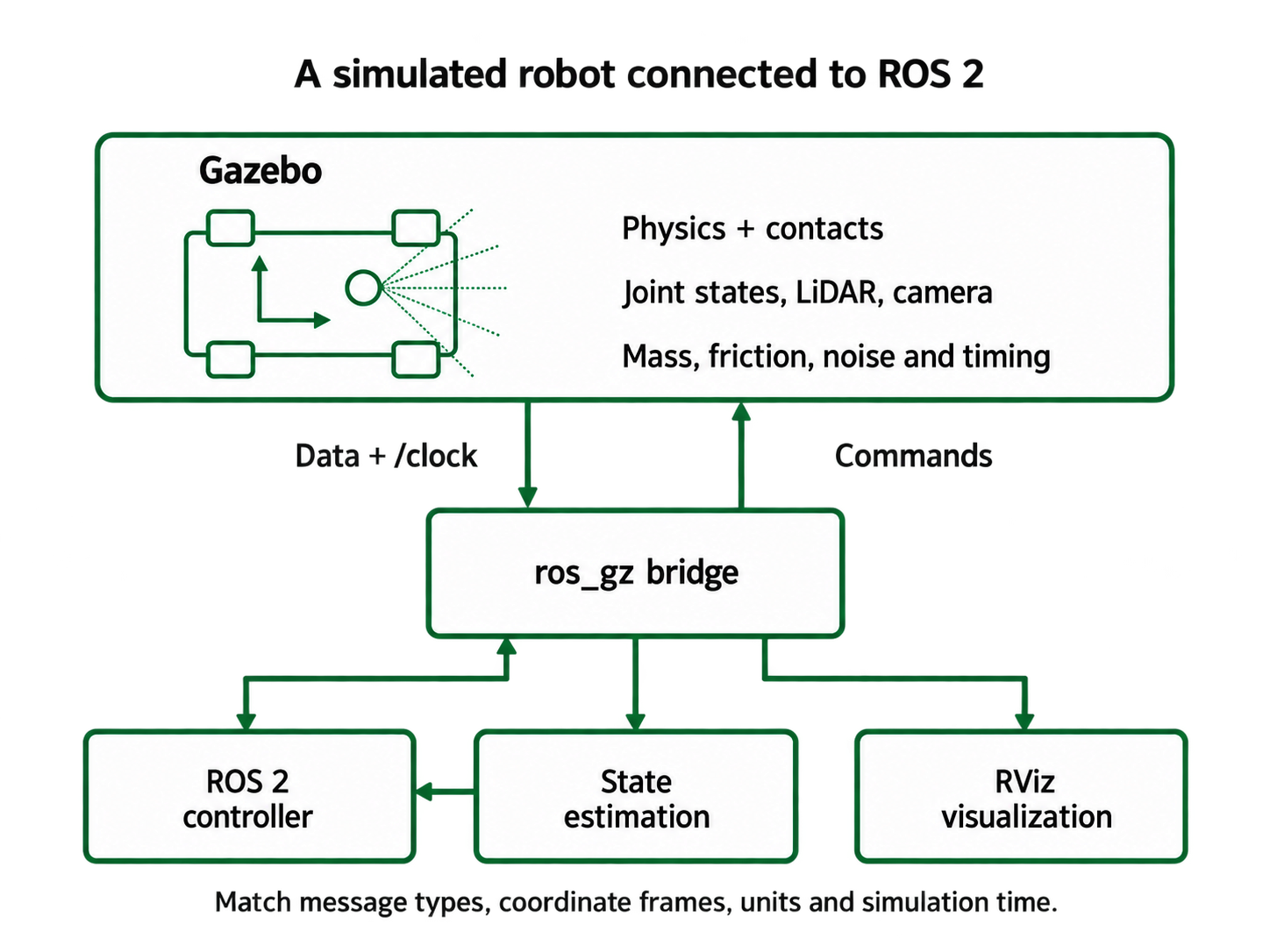
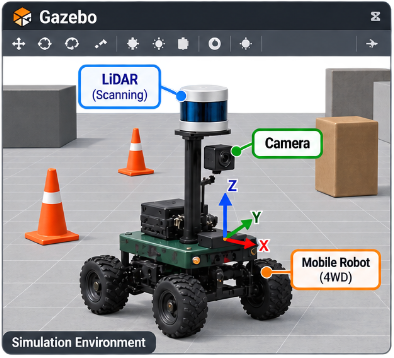
Figure 8.3 illustrates how a mobile-robot scene can make sensor placement, the body frame, and obstacle geometry visible while developing a simulation. The interface diagram in Figure 8.2 defines the separate roles of the simulator, bridge, controller, and visualization tools.

EMBEDDED LINUX Fall 2026

ChatGPT Image Sep 28, 2026, 01_11_34 PM
Figure 8.2.  Gazebo can exercise ROS 2 interfaces and algorithms before hardware deployment, but model validity determines what the simulation evidence means.

دکتر
Figure 8.3.  Author’s conceptual illustration of a mobile robot with LiDAR and a camera in a simulation environment. This artwork is not a captured Gazebo experiment or measured result; software interfaces and physical performance require separate verification.

EMBEDDED LINUX Fall 2026

8.16   CoppeliaSim and ROS 2

CoppeliaSim provides scene modeling, dynamics, sensors, scripting, remote APIs, and ROS 2 interface mechanisms. A ROS 2-enabled scene can publish simulated joint/sensor state and subscribe to commands, allowing external navigation or control nodes to treat the simulator as a robot.

Good integration preserves:

  • one authoritative simulation clock and correct /clock use;
  • consistent joint names and coordinate frames;
  • explicit units and sign conventions;
  • defined synchronous or stepped simulation behavior;
  • command timeouts and reset semantics;
  • realistic actuator limits, inertia, friction, latency, noise, and collision geometry; and
  • a mapping document between CoppeliaSim objects and ROS interfaces.

CoppeliaSim’s remote API and ROS 2 plugin solve different integration problems. Use ROS 2 when interoperability with the ROS graph is valuable; use a direct remote API when one application controls a bounded simulator and ROS adds no benefit.

8.17   ROS 2 on Raspberry Pi and NVIDIA Jetson

ROS 2 can run on a Raspberry Pi when the selected distribution supports the operating system and ARM architecture. A common path is supported 64-bit Ubuntu with binary ROS packages. Raspberry Pi OS may require containers or source builds depending on distribution support. Verify the official platform matrix before installation.

Pi constraints include RAM, SD-card endurance, power, thermal throttling, network bandwidth, and limited performance for large point clouds or vision. Run sensor drivers, low-rate coordination, and lightweight navigation components there; move demanding perception to suitable hardware.

ROS 2 can also run on NVIDIA Jetson platforms. Jetson is attractive for CUDA-accelerated vision and inference. The operating system is tied to a JetPack/L4T release, which may not align with the Ubuntu version expected by a particular ROS distribution. NVIDIA Isaac ROS packages target specific Jetson/software combinations.

The original Jetson Nano is a legacy, resource-limited platform with older supported software stacks. It can run compatible ROS/ROS 2 combinations or containers/source builds, but students should not assume that the newest ROS 2 binaries install cleanly. For a new production design, select a currently supported Jetson and pin JetPack, CUDA, ROS 2, container, and driver versions.

8.18   ROS 2 and Microcontrollers

Ordinary desktop ROS 2 middleware is too large for many MCUs. micro-ROS brings ROS 2 concepts to microcontrollers using a client architecture commonly based on DDS-XRCE. A micro-ROS client runs on the MCU and communicates through serial, UDP, or another transport to a micro-ROS Agent on Linux, which participates in the wider ROS 2 graph.

This supports typed publishers, subscribers, services, and related entities while preserving MCU control of hardware. Limitations include static memory design, transport dependence, agent

EMBEDDED LINUX Fall 2026

availability, executor scheduling, supported RTOS/board combinations, and lack of automatic safety certification.

Use micro-ROS when ROS interface continuity and tooling outweigh complexity. A compact custom protocol may be more appropriate for a small safety controller. In either design, stale command timeout and local safe state must survive loss of the Linux agent.

8.19   ROS 2 and CAN Bus

CAN provides robust framed communication and arbitration at lower layers. ROS 2 provides process-to-process semantics. They are complementary, not interchangeable.

On Linux, SocketCAN exposes CAN interfaces through network-style APIs. A bridge or hardware-interface plugin maps CAN/CANopen/J1939/vendor frames to ROS messages and commands. Frameworks such as ros2_control can represent actuators through hardware interfaces, while CANopen-oriented packages can manage standardized objects and drives.

The bridge must define:

  • CAN bitrate, termination, identifiers, byte order, scaling, units, and cycle time;
  • transmit priority and bus-load budget;
  • heartbeat, error state, bus-off recovery, and device boot state;
  • ROS QoS, command freshness, and conversion timestamps;
  • actuator authority, state feedback, and safe behavior if ROS stops; and
  • whether safety-certified CAN traffic is isolated from experimental traffic.

Publishing a ROS topic reliably cannot overcome an overloaded CAN bus or a drive that rejected the command. Preserve lower-layer error counters and device status.

8.20   ROS 2 with MATLAB and Simulink

MathWorks ROS Toolbox connects MATLAB and Simulink to ROS and ROS 2 networks. It supports message publication/subscription, services/actions depending on workflow, bag import and playback, custom messages, visualization/analysis, simulator or hardware connection, and code-generation workflows with the appropriate products.

Typical uses are:

  • analyze recorded ROS bags and compare algorithms;
  • design and tune control or sensor-fusion models in Simulink;
  • connect MATLAB perception/planning prototypes to live topics;
  • generate C++ ROS 2 nodes for deployment where supported; and
  • test one model against Gazebo, CoppeliaSim through ROS interfaces, or physical hardware.

MATLAB licenses, code-generation compatibility, message versions, QoS, execution rate, and generated-code performance must be planned. A desktop MATLAB callback is not a hard real-time controller simply because it receives ROS messages.

EMBEDDED LINUX Fall 2026

8.21   Navigation, Manipulation, and ros2_control

The ROS 2 ecosystem includes Nav2 for mobile-robot navigation, MoveIt for manipulation, and ros2_control for controller/hardware abstraction. These frameworks save major development effort but require correct models and interfaces.

For Nav2, students must understand localization, maps, costmaps, planners, controllers, recovery behavior, transforms, footprint, sensor clearing/marking, velocity limits, and lifecycle. For MoveIt, collision geometry, joint limits, kinematics, planning scene, controller execution, and calibration matter. For ros2_control, distinguish command interfaces, state interfaces, controller-manager timing, and the lower-level hardware loop.

No navigation stack can guarantee safety from a poorly mounted sensor, wrong footprint, stale transform, or actuator without command timeout.

8.22   Industrial Robotics and ROS-Industrial

ROS and ROS 2 are used beyond academia in prototyping, logistics, mobile robots, manipulation, inspection, and industrial integration. ROS-Industrial promotes industrially relevant drivers, capabilities, and quality practices. Commercial autonomous mobile robots and robot-cell applications may use ROS-derived components, vendor-supported ROS 2, or proprietary middleware.

Industrial adoption does not mean ordinary community packages are placed directly in a safety loop. A common architecture keeps certified robot controllers, drives, safety PLCs, scanners, interlocks, and emergency circuits authoritative. ROS 2 performs perception, task planning, orchestration, or non-safety motion requests across a controlled interface.

Production requires dependency control, long-term support, deterministic startup, diagnostics, cybersecurity, validation, update and rollback, fault containment, and supplier responsibility. Forking an abandoned package creates maintenance ownership.

8.23   Autonomous Vehicles and Functional Safety

ROS 2 can support autonomous-vehicle research and non-safety or supervised production functions, and ecosystems such as Autoware build autonomous-driving functionality around ROS 2. This does not make generic ROS 2 safety-certified.

Road vehicles may require processes aligned with ISO 26262 functional safety, ISO 21448:2022 SOTIF, cybersecurity regulation/engineering, and jurisdictional approval. A safety architecture identifies hazards, integrity requirements, freedom from interference, verified components, fallback, independent monitoring, and evidence across the lifecycle.

ROS 2 may carry perception and planning information while a separate safety controller monitors speed, braking, command freshness, boundaries, or minimum-risk maneuver. Whether ROS 2 is acceptable depends on the safety case, selected implementations, controlled configuration, development process, and independent mitigations—not the ROS name.

8.24   Aircraft, Fighter Jets, and Military Systems

Standard ROS 2 should not be described as certified flight-control software for passenger aircraft or fighter jets. Civil airborne software commonly requires assurance under standards such

EMBEDDED LINUX Fall 2026

as DO-178C, with partitioned avionics architectures, certified RTOSs, deterministic networks, qualified tools where applicable, rigorous traceability, and extensive verification. DDS technology may appear in high-assurance and defense systems, but DDS use does not imply ROS 2 use or certification.

Public research, ground systems, robotic vehicles, payloads, simulators, and experimental unmanned aircraft may use ROS or ROS 2. Claims about operational fighter-aircraft software are often classified, proprietary, or unverifiable; they should not be invented from research demonstrations.

Military suitability is not a technical quality category. A system used in a defense prototype may still lack civilian certification, deterministic guarantees, cybersecurity accreditation, or safe failure. Conversely, a proprietary military system may use standards and middleware unavailable publicly.

8.25   Autonomous Drones Without ROS

Autonomous drones commonly separate the flight controller from a companion computer. PX4 often runs on NuttX, while ArduPilot commonly runs on real-time embedded platforms such as ChibiOS-supported hardware. The autopilot handles attitude/rate control, estimation, actuator output, failsafes, arming, geofence, and return behavior. Communication with a ground station or companion computer often uses MAVLink; modern integration may also use DDS/uXRCE-DDS-related paths depending on platform.

A companion computer—Raspberry Pi, Jetson, or another Linux computer—may run ROS 2 for camera perception, mapping, high-level planning, and mission logic. If ROS 2 crashes or communication fails, the autopilot must continue stable flight and execute a defined failsafe. Do not place the only motor stabilization loop in a Python ROS node over Wi-Fi.

For highly assured aircraft, organizations may use proprietary flight stacks, certified RTOSs, redundant flight computers, formally controlled interfaces, and standards-based avionics buses. The architecture is selected from assurance requirements, not developer convenience.

8.26   Security and Graph Boundaries

With a supported DDS-based RMW, ROS 2 security can use DDS Security capabilities for authentication, encryption, and access control. Other middleware choices require their own supported security configuration. Security is not automatically enabled or correctly configured [56]. Discovery metadata, permissions files, certificate lifecycle, clock, keystore protection, node impersonation, and denial of service require attention.

Place untrusted cloud, student, visitor, or Internet networks outside the robot control graph. Use an application gateway that validates identity, schema, rate, and command authority. Record administrative and command actions. Network segmentation is valuable, but it does not replace endpoint security.

Never assume ROS_DOMAIN_ID, namespaces, or hidden topic names are security controls. They organize discovery and names; they do not authenticate or authorize participants.

EMBEDDED LINUX Fall 2026
Flight stabilization and failsafes IMU, GNSS barometer Autopilot / RTOS estimation + control Motor outputs Camera / LiDAR ROS 2 companion vision + planning bounded mission interface Companion-computer failure must leave flight stabilization and failsafes available.

Figure 8.4.  Typical autonomy partition: the autopilot retains flight stabilization and failsafes; ROS 2 on a companion computer provides high-level autonomy through a bounded interface.

8.27   Docker and Reproducible ROS 2 Deployment

Containers can package ROS 2 user space, dependencies, and configuration. They share the host kernel and do not automatically provide hardware, real-time, graphics, multicast, GPU, or device access.

Challenges include DDS discovery across container networks, host networking trade-offs, device permissions, shared memory, X11/Wayland display, NVIDIA runtime, real-time capabilities, clock, and large image size. Run as non-root, pin base images and packages, drop capabilities, mount only required devices, and avoid exposing the Docker socket.

For a hard real-time or safety path, additional container indirection must be justified and measured. A reproducible image is valuable, but reproducibility includes kernel, firmware, driver, GPU runtime, middleware implementation, and host configuration where those affect behavior.

8.28   Failure Modes and Systematic Diagnosis

Common ROS 2 failures include:

  • workspace not sourced or wrong overlay order;
  • mismatched message package or stale generated interface;
  • same topic name but incompatible type or QoS;
  • incorrect namespace or remapping;
  • blocked discovery multicast, wrong domain, or firewall;
  • duplicate node names or conflicting parameter assumptions;
  • stale/missing transforms or incorrect frame tree;
  • simulation time enabled without /clock;
  • callback blocked by I/O or executor starvation;
EMBEDDED LINUX Fall 2026
  • network saturation from images/point clouds;
  • device permission failure inside service/container;
  • lifecycle node configured but not activated;
  • bag replay with incompatible QoS or clock assumptions; and
  • hardware continuing an old command after ROS failure.

Diagnose from evidence: ros2 node list, ros2 topic list -t, ros2 topic info --verbose, ros2 interface show, ros2 doctor, ros2 param list, ros2 action list, ros2 service list, TF inspection, DDS/network capture, system logs, tracing, and lower-level device/bus diagnostics.

8.29   Guided Laboratory: Distributed ROS 2 Robot Service

Laboratory objective
Build and deploy a two-node ROS 2 application, inspect its graph and QoS, record/replay evidence, and distribute it across two machines or a machine and simulator. Integrate one external boundary—microcontroller, CAN, MQTT, Gazebo, CoppeliaSim, or MATLAB—and demonstrate safe behavior during communication and process failure.

Part A—package.   Implement the temperature publisher and monitor or an equivalent sensor/command pair. Use a standard or custom typed message with timestamp, frame, unit/meaning, status, and bounded QoS.

Part B—inspection.   Record node, topic, type, QoS, rate, and graph information. Introduce one QoS incompatibility, observe failure, diagnose it, and restore compatibility.

Part C—multi-machine or simulator.   Run publisher and subscriber on separate hosts, or place one side in Gazebo/CoppeliaSim. Document OS, ROS distribution, RMW, domain, addresses, discovery configuration, firewall, and clock.

Part D—timing.   Measure publication rate, observation-to-callback latency where clocks permit, jitter, stale-data age, CPU load, and loss under normal and loaded network conditions. State the limitations of the method.

Part E—record/replay.   Record selected topics and metadata with ros2 bag. Replay under simulator time or controlled conditions and explain what the replay does not reproduce.

Part F—external integration.   Connect one ROS boundary to micro-ROS, CAN/SocketCAN, MQTT, MATLAB, Gazebo, or CoppeliaSim. Document the mapping of identity, units, frames, timestamps, QoS, timeout, and error states.

Part G—fault injection.   Stop each node, block discovery or data traffic, change domain, publish wrong frame, delay callback, remove hardware permission, restart the host, and disconnect the lower-level controller. Verify that commands expire and physical/simulated output reaches a defined safe state.

Portfolio evidence
Include the architecture and responsibility diagram, package and interface definitions, QoS rationale, launch/configuration, graph evidence, multi-machine settings, timing results, bag metadata, external bridge contract, fault-test matrix, deployment revision, and a clear statement of which functions are not safety-assured by ROS 2.
Block 415:00–15:50content

Block 4 · 15:00–15:50 · ROS 2 Robotics Applications, Safety, and Deployment

EMBEDDED LINUX Fall 2026

8.30   Self-Assessment and Job-Interview Preparation

These questions support Module 8 and future interviews in robotics, embedded Linux, autonomous systems, simulation, industrial integration, and distributed middleware. Strong answers explain architecture and evidence rather than repeating ROS terminology.

Questions

Q1.  What problem did ROS solve that robot laboratories repeatedly faced before it?

Q2.  Compare ROS 1 and ROS 2 discovery, transport, QoS, security, and lifecycle.

Q3.  Why is ROS 2 called middleware rather than an operating system in the usual kernel sense?

Q4.  When is traditional MCU firmware or a small Linux service better than ROS 2?

Q5.  Distinguish a topic, service, action, parameter, transform, and lifecycle node.

Q6.  Choose QoS for a 30 Hz LiDAR stream and justify reliability, depth, and lifespan.

Q7.  Why can matching topic names and message types still fail to communicate?

Q8.  What does ROS_DOMAIN_ID do, and why is it not a security mechanism?

Q9.  Design a two-machine ROS 2 diagnostic sequence when nodes cannot discover each other.

Q10.  List the major contributors to end-to-end sensor-to-actuator latency.

Q11.  Why does DDS reliable delivery not guarantee a real-time deadline?

Q12.  Compare single-threaded and multi-threaded executors.

Q13.  Why are frame ID and observation timestamp essential for sensor fusion?

Q14.  What can a ROS bag reproduce, and what important behavior may it not reproduce?

Q15.  Can ROS 2 run on a Raspberry Pi? What determines whether that is a good design?

Q16.  Can current ROS 2 software always be installed directly on an original Jetson Nano? Explain the compatibility issue.

Q17.  Explain micro-ROS client and Agent roles and one reason to use a custom protocol instead.

Q18.  How should CAN bus and ROS 2 responsibilities be separated?

Q19.  What does MATLAB/Simulink add to a ROS 2 workflow, and what does it not guarantee?

Q20.  Compare Gazebo and CoppeliaSim integration with physical validation.

Q21.  Is ROS 2 safe for autonomous road vehicles? Give a system-level answer.

Q22.  Is ordinary ROS 2 appropriate as certified flight-control software in a passenger aircraft or fighter jet?

Q23.  Describe a robust drone architecture combining PX4/ArduPilot-class autopilot and ROS 2.

Q24.  How can ROS 2 be used in an industrial robot cell without owning the certified safety function?

Q25.  Why are namespaces and hidden topics inadequate security controls?

Q26.  What new problems appear when ROS 2 runs inside Docker?

Q27.  Design the smallest useful ROS 2 project demonstrating publisher, subscriber, QoS, failure detection, and recovery.

Answers and discussion

A1.It standardized reusable drivers, typed communication, package/build conventions, launch, transforms, recording, visualization, and inspection so teams did not rebuild incompatible infrastructure for every robot.

A2.ROS 1 uses a central master and TCPROS/UDPROS with limited QoS/security/lifecycle support. ROS 2 uses middleware-specific discovery through RMW (commonly DDS), explicit QoS, security integration, lifecycle nodes, composition, and broader platform/real-time design intent.

EMBEDDED LINUX Fall 2026

A3.On a Linux deployment, Linux remains the actual OS kernel managing CPU, memory, devices, and processes; ROS 2 also supports other operating systems on selected platforms. ROS 2 runs in user space and connects components; its name is historical branding, not a claim to replace Linux.

A4.Prefer simpler software when functions are few, interfaces fixed, resources tight, deadlines strict, attack surface must be minimal, certification architecture is controlled, and ROS ecosystem reuse would not repay dependency and validation cost.

A5.Topic: asynchronous stream; service: bounded request/response; action: long goal with feedback/cancel/result; parameter: node configuration; transform: time-indexed frame relationship; lifecycle: standard managed operational states.

A6.Often best effort, keep-last with small depth, and short lifespan because current scans are more valuable than delayed backlog. Reliable may be justified on a controlled link if loss cost exceeds delay/resource cost. Measure the actual system.

A7.QoS offered/requested policies may be incompatible, discovery may fail, domain/network may differ, or generated interface definitions may differ despite the same visible type name.

A8.It separates DDS discovery domains so unrelated graphs do not normally discover one another. It does not authenticate participants, encrypt traffic, or authorize topic access.

A9.Verify local nodes and sourced environments, distribution/RMW/domain, IP address and routes, host firewalls, multicast or discovery-server configuration, VPN/VLAN/Wi-Fi isolation, clocks, endpoint QoS/types, and packet-level discovery evidence.

A10.Sensor conversion, driver queues, kernel scheduling, serialization, middleware, network, subscriber queue, executor wait, callback, computation, lower bus, actuator driver, and physical response.

A11.Retransmission improves eventual delivery under assumptions but can add unbounded waiting and queuing. OS scheduling, allocation, network contention, callbacks, and hardware remain outside a hard bound unless engineered and verified.

A12.Single-threaded execution simplifies ordering but one callback blocks all. Multi-threaded execution increases concurrency but introduces races, locks, callback-group behavior, and less obvious priority. Choose from timing and shared-state design.

A13.The frame gives geometric meaning; timestamp allows transforms and state to be evaluated at acquisition time. Wrong frame/time produces incorrect fusion even if numeric values are accurate.

A14.A bag reproduces recorded topic data and timing-related playback options. It may not reproduce original thread scheduling, network loss, device timing, unrecorded parameters/services, random physics, clocks, actuator dynamics, or environmental interaction.

A15.Yes, on a supported OS/architecture or through a justified build/container. Good design depends on RAM, CPU, thermal, storage, network, data rate, package support, lifecycle, and whether demanding perception exceeds the platform.

A16.Jetson software is coupled to specific JetPack/L4T and Ubuntu versions. The legacy Nano stack may not match binary targets of a current ROS 2 distribution or modern Isaac ROS. Use a compatible older combination, container/source build with testing, or a supported newer Jetson.

A17.The MCU runs a resource-conscious micro-ROS client and communicates through a transport to an Agent that joins the ROS 2 graph. A custom framed protocol may be smaller, easier to certify/analyze, or more independent of the Agent for a fixed safety controller.

A18.CAN supplies prioritized lower-level frames and bus-error mechanisms; bounded timing still requires bus-load and priority analysis. A device protocol defines device state; a bridge/hardware interface maps them to typed ROS state/commands. Local drives/MCUs enforce freshness and safety if ROS stops. Bus load and errors remain visible.

A19.MATLAB/Simulink support algorithm development, analysis, bag playback, modeling, simulation, live ROS access, and supported code generation. They do not automatically provide real-time timing, safe architecture, correct QoS, or certification.

EMBEDDED LINUX Fall 2026

A20.Both simulators exercise models and ROS interfaces, but results depend on geometry, inertia, friction, sensor, timing, contact, and actuator models. Hardware validation remains necessary for physical performance and safety.

A21.ROS 2 may support perception/planning and platforms such as Autoware, but safety depends on the complete ISO 26262/SOTIF/cybersecurity process, verified components, fallback, fault containment, and independent safety mechanisms. Generic ROS 2 is not automatically safety-certified.

A22.No such general claim is justified. Certified airborne control requires rigorous standards, partitioning, traceability, verification, and approved components. DDS or ROS use in research/mission systems does not make ordinary ROS 2 certified flight-control software; fighter details may be classified.

A23.Keep stabilization, state estimation, arming, actuator output, and failsafes on the real-time autopilot. Use ROS 2 on a companion for perception and high-level planning through a bounded MAVLink/DDS-related interface. The autopilot must remain stable and execute failsafe if ROS or the link fails.

A24.Retain vendor robot controller, safety PLC, scanners, interlocks, and emergency circuits as authority. ROS 2 supplies perception, planning, and supervised requests through validated limits and monitored interfaces.

A25.They organize names and reduce accidental collisions but do not prove identity, restrict packet access, encrypt data, or prevent a malicious participant from publishing the same name.

A26.Discovery/multicast networking, device and GPU access, shared memory, display, time, real-time capabilities, user permissions, host-kernel dependence, and container image/driver compatibility require explicit configuration and testing.

A27.Use one timestamped typed publisher and one validating subscriber with deliberate QoS, freshness timeout, logs, launch file, graph inspection, bag recording, and a test that stops/restarts the publisher and demonstrates stale detection and recovery. Add complexity only after this works visibly.

8.31   Authoritative References and Verification Links

ROS distributions, platforms, simulators, and integrations evolve. Verify current support using primary documentation:

  • ROS and ROS 2 documentation
  • ROS 2 design articles, including DDS and real-time rationale
  • ROS 2 Jazzy installation documentation and target platforms
  • ROS 2 Quality of Service concepts
  • micro-ROS documentation
  • Gazebo documentation
  • CoppeliaSim manual and ROS 2 integration references
  • MathWorks ROS Toolbox documentation
  • ros2_control documentation
  • Nav2 documentation
  • MoveIt documentation
  • PX4 autopilot documentation
  • ArduPilot documentation
  • NVIDIA Isaac ROS platform documentation
EMBEDDED LINUX Fall 2026
Chapter summary
ROS 2 is valuable when robotics software benefits from reusable components, typed interfaces, transforms, visualization, simulation, recording, inspection, and distributed computation. Its RMW abstraction and QoS make it substantially more capable than ROS 1 for modern systems, but discovery, QoS compatibility, network load, timing, lifecycle, security, and dependency management remain engineering responsibilities. Raspberry Pi and Jetson can host appropriate ROS 2 workloads; micro-ROS and CAN connect lower-level controllers; MATLAB, Gazebo, and CoppeliaSim support design and validation. Production robots use ROS 2 when its benefits justify its complexity, while certified safety, vehicle fallback, and flight stabilization remain in independently assured controllers and processes. ROS 2 is neither only academic nor automatically safe: its suitability is determined by system architecture and evidence.

Summary

This chapter introduces ROS 2 as a framework for robot integration, communication, simulation, and deployment. It compares ROS 1 and ROS 2, explains nodes, topics, services, actions, parameters, QoS, DDS discovery, executors, and concurrency, and develops a practical publisher/subscriber project. It also covers Gazebo and CoppeliaSim simulation, deployment on Raspberry Pi and NVIDIA Jetson, micro-ROS, CAN bus, MATLAB/Simulink integration, navigation, industrial robotics, autonomous systems, security, containers, diagnostics, and systematic failure analysis.

Course outline

What we will learn

From Linux foundations to physical interfaces, networking, security and a complete embedded system.

Linux foundationsKernel, users, processes and file systems
Command lineShells, scripting and automation
Embedded hardwareBoot, storage and device drivers
Physical I/OGPIO, sensors and actuators
Device busesUART, I²C and SPI
NetworkingTCP/IP, SSH and remote management
Distributed systemsMessage passing and cooperating nodes
Engineering practiceGit, testing, logging and deployment
SecurityLeast privilege, updates and secrets

Teaching method

Short introductions are followed by laboratory activities. Work is normally completed in teams of three. Each team develops an embedded Linux system; the examination portfolio is individual.

Project ideas

Applications you could build

Each project should begin with one reliable end-to-end function.

Automatic Raspberry Pi-based GPS trackerSample examination report available in PDF format
Environmental monitoring stationValidated sensing, local storage and dashboard
Energy monitoring systemMeasure, log and visualize equipment power use
Greenhouse automationClimate sensing, actuation and remote supervision
Field-robot telemetryLocation, operating state, measurements and faults
LoRaWAN sensor networkField nodes, TTN integration and private cloud
Intelligent irrigationSensing, decisions, valves and safe failure handling
Multi-node IoT gatewayProtocol translation, buffering and secure forwarding
ROS 2 communication systemDistributed nodes, QoS and service integration
Edge-AI monitoring systemLocal inference, measured performance and safe fallback

A complete project should demonstrate

NeedA clear user and purpose
Physical interfaceA sensor, actuator or device
Linux integrationPrograms, scripts or services
CommunicationA justified data-exchange method
ReliabilityLogging and failure handling
EvidenceTests, results and reflection

Contractor and client roles

Project groups

Each group develops a project for one client group and evaluates the project received from another contractor group.

Contractor

Heros

ProjectProject 01
Delivers to
Client not assigned
Receives from
Contractor not assigned

Fridays · four 50-minute slots · Odense

Fall 2026 lecture plan

The SDU timetable remains authoritative for dates, times and rooms.

Project progression

Project ideas and proposals begin in Module 1 and evolve throughout the course. Module 10 is the formal integration, architecture and verification review; Modules 11–12 complete implementation, demonstration and individual portfolio evidence.

Lecture 08 · participation

Student questions

Questions remain hidden until the student is called. Model answers are revealed separately.

Instructor classroom view

The roster, answers, attendance and participation records are available only to the authorized primary owner after sign-in.

Instructor sign in

Definitions

Essential course vocabulary

Plain-language definitions for the technical terms used throughout the course.

TermDefinitionExample
ActuatorA device that produces a physical action.Motor, valve, relay or fan
BootThe sequence that starts the hardware, kernel, services and applications.Starting an embedded computer
CLIA text interface that accepts commands.Windows Terminal or a Linux terminal
CommandAn instruction interpreted by a shell.pwd, ls or Get-Location
Device driverSoftware through which the operating system communicates with hardware.GPIO or camera driver
DirectoryA named container for files and other directories./home/student/eml
DistributionA complete operating system built around the Linux kernel.Ubuntu or Debian
Embedded systemA computer integrated into a larger product for a defined purpose.Greenhouse controller
File systemThe structure used to name, store and retrieve files.ext4
GPIOA configurable digital input or output pin.Reading a switch
I²CA two-signal serial bus for peripherals.Environmental sensor
KernelThe privileged core managing memory, processors, devices and processes.Linux kernel
MQTTA lightweight publish/subscribe messaging protocol.Sending sensor data
ProcessA running instance of a program.A data logger
PWMRapid switching used to control average power or a signal duty cycle.Motor speed
RootThe privileged Linux user or the top directory, depending on context.Administrative access
ScriptA file containing commands that automate work.A backup script
SensorA device that converts a physical quantity into data.Temperature sensor
ServiceA background program providing an ongoing function.SSH server
ShellA program that interprets commands and starts programs.Bash or PowerShell
SPIA synchronous bus commonly used for fast peripherals.Display or converter
SSHEncrypted remote command-line access.Managing a Raspberry Pi
TCP/IPThe principal protocol family used across computer networks.Device-to-server communication
UARTAn asynchronous serial interface.Debug console
User spaceThe environment where ordinary programs run outside the kernel.Application software
Version controlA system that records and manages file changes.Git

Official examination information · EKA T550077102

Individual portfolio examination

Form

Portfolio

Individual presentation portfolio submitted at semester end.

Grade

7-point scale

No second examiner.

Weighting

No split published

No separate written-exam or coursework percentages are stated.

Re-examination

Same form

Same form as the ordinary examination.

Team project and individual assessment

The team project creates practical evidence, but each student is assessed individually through the presentation portfolio. Classroom participation points support engagement and do not form part of the official grade.

Document from the beginning

  • Your own decisions and identifiable contribution
  • Commands, code, configuration and version history
  • Tests, results, failures and improvements
  • Reflection on trade-offs and learning

People and course systems

Contacts and official links